
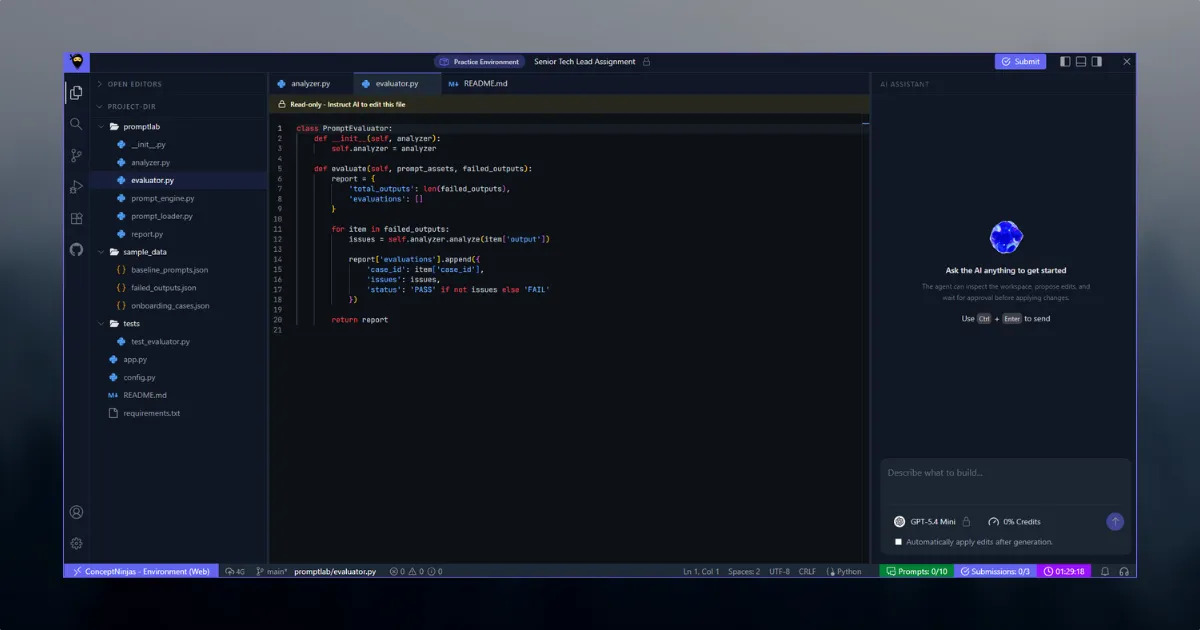
AI Lab started with a relatively simple requirement:
ConceptNinjas wanted to conduct technical assessments where candidates would not just write code themselves. They would work with an AI coding agent, much like modern developers increasingly do in their day-to-day work.
The candidate would receive a problem statement and a development environment directly in the browser.
The environment needed to provide:
- A VS Code-like editor
- An AI chat interface
- A browser-based file system
- Terminal access
- Code execution
- An isolated sandbox when required
- Live previews for web applications
- Configurable AI models
- Configurable usage limits
- An evaluation system
- Session controls
- Candidate scoring and feedback
The important part was that this was not supposed to be a normal online code editor with an AI chatbot attached to it.
The AI needed to be able to work with the candidate's project.
It needed to understand the current files, modify them, use tools, execute commands, inspect results, and help the candidate work through the problem.
At the same time, the institute creating the assessment needed control over how much of that capability a candidate was allowed to use.
I was asked to lead the design and development of the entire system.
I built the product from scratch and was responsible for the architecture, implementation, integration, debugging, and making the system usable as a real assessment environment.
Today, the platform is used by roughly 500 candidates every week across multiple institutes.
01. The problem was bigger than an AI chat interface
The first important design decision was understanding that the AI chat was not the product.
The product was the development environment surrounding the agent.
A candidate session could be represented as:
Candidate
   │
   ▼
Assessment Session
   │
   ├── Problem Statement
   ├── AI Model
   ├── Chat Limits
   ├── Token Limits
   ├── Evaluation Limits
   ├── Session Time
   ├── Files
   ├── Terminal
   ├── Sandbox
   └── Evaluation Rules
The AI agent operated inside this environment.
This meant that the system needed to keep track of much more than conversation messages.
It needed to understand:
- What test the candidate was taking
- Which model the session was using
- How much time remained
- How many interactions were available
- How many tokens could be consumed
- What files currently existed
- Whether a sandbox was enabled
- What commands could be executed
- What evaluation rules applied
- What state the candidate's project was currently in
The session therefore became the central concept of the architecture.
02. The assessment is configured by the institute
One of the requirements that shaped the architecture was that the assessment should not be hard-coded.
The institute creating a test controls the environment.
Depending on the assessment, they can configure things such as:
- AI model
- Maximum chat interactions
- Token limits
- Session duration
- Evaluation limits
- Whether a sandbox is available
- Evaluation parameters
- Problem statement
- Expected behavior
- Other test-specific constraints
This makes AI Lab less like a single-purpose coding exercise and more like a configurable assessment platform.
A test might therefore look conceptually like:
Assessment
│
├── Problem
│
├── Model
│   └── Claude / Gemini / OpenAI
│
├── Session
│   └── 60 minutes
│
├── AI Usage
│   ├── Chat limit
│   └── Token limit
│
├── Sandbox
│   └── Enabled
│
└── Evaluation
    ├── Criteria A
    ├── Criteria B
    └── Criteria C
The candidate receives a session generated from these settings.
This separation was important because the candidate should not be able to change the rules of the environment they are being evaluated in.
03. Designing the candidate workspace
The main interface was designed around a familiar development workflow.
The candidate has a code editor, file explorer, terminal, AI chat, and preview area when required.
Conceptually:
┌──────────────────────────────────────────────────────────────┐
│                        AI LAB IDE                            │
├────────────┬──────────────────────────────┬──────────────────┤
│            │                              │                  │
│   Files    │          Editor              │    AI Chat       │
│            │                              │                  │
│  src/      │  index.ts                   │  Candidate       │
│  package   │  ...                        │  Agent            │
│  ...       │                              │                  │
│            │                              │                  │
├────────────┴──────────────────────────────┴──────────────────┤
│                         Terminal                             │
├──────────────────────────────────────────────────────────────┤
│                     Live Preview                             │
└──────────────────────────────────────────────────────────────┘
The interface itself was not the hardest part.
The difficult question was:
What is the source of truth for the project files?
The candidate is working in a browser, but the AI agent and remote execution environment also need access to those files.
That led to one of the more important architectural decisions in the project.
04. Keeping the project local to the browser
One of the requirements was that the candidate's project should primarily live locally in the browser.
A normal server-backed editor would look something like:
Editor
   ↓
API
   ↓
Server
   ↓
Database / Filesystem
That would introduce unnecessary network dependency for every file operation.
Instead, I designed the local project around IndexedDB.
The browser became the primary workspace for the candidate's files.
Browser
│
├── Editor
│
├── File Explorer
│
├── AI Agent
│
└── Terminal Integration
       │
       ▼
   Local VFS
       │
       ▼
   IndexedDB
This created a persistent virtual filesystem inside the browser.
The challenge was that IndexedDB itself is not a filesystem API.
The rest of the application still needed simple operations such as:
readFile()
writeFile()
deleteFile()
createDirectory()
listDirectory()
I therefore created an abstraction over IndexedDB that behaved more like a filesystem.
That eventually became a separate npm package.
05. Virtual File System Using Indexed DB (vfs-idb)
The package became vfs-idb, a browser virtual filesystem backed by IndexedDB.
I originally built it specifically for AI Lab.
During development, I shared the idea with friends who pointed out that the abstraction could be useful outside this project as well.
I decided to keep it as a standalone npm package rather than leaving it as internal project code.
The important architectural benefit was that the rest of AI Lab did not need to know how files were physically stored.
The application could work with a filesystem abstraction:
AI Lab
   │
   ▼
Virtual File System
   │
   ▼
IndexedDB
This also made the browser-local nature of the workspace explicit.
The editor, agent tools, and other parts of the client could work with the same file abstraction.
Instead of having separate implementations for each part of the application, they could operate against the same project filesystem.
06. Giving the AI agent access to the project
A normal chatbot receives a message and generates a response.
That was not sufficient here.
The AI agent needed to operate on the project.
For example, a candidate might say:
"Create a login page with form validation."
The useful response is not simply a code snippet in the chat.
The agent needs to:
- Inspect the existing project.
- Understand its structure.
- Create or modify files.
- Potentially install or use existing dependencies.
- Run the application.
- Inspect the result.
- Make corrections.
That requires tools.
The agent therefore had access to operations around the project environment.
Conceptually:
                    AI Agent
                       │
          ┌────────────┼────────────┐
          │            │            │
          ▼            ▼            ▼
       File Tools   Terminal     Session Context
          │            │
          ▼            ▼
       Browser VFS   Sandbox
The agent could interact with the same project the candidate was working on.
This was one of the key differences between the system and simply embedding an AI chatbot beside a code editor.
07. Connecting the browser filesystem to execution
A browser filesystem is useful for editing.
It is not enough for running arbitrary development workloads.
Some assessments only need the editor and basic project manipulation.
Others require an actual runtime.
For those tests, the system can provide an isolated E2B sandbox.
The important architectural distinction is:
Browser VFS
     │
     │
     ├── Editor
     └── AI Tools

     +

E2B Sandbox
     │
     ├── Runtime
     ├── Terminal
     ├── Compiler
     └── Application Server
The browser remains the candidate's working environment, while the sandbox provides an execution environment when the assessment requires it.
This separation also allowed the assessment configuration to decide whether a sandbox was needed at all.
Not every test requires a complete remote runtime.
08. Isolated sandbox per candidate
When sandbox execution is enabled, each candidate/test session receives its own isolated E2B environment.
This was important for both correctness and security.
Consider two candidates running code at the same time.
Their environments cannot simply share:
- Processes
- Files
- Environment state
- Ports
- Installed dependencies
- Runtime output
Each session needs its own execution environment.
Conceptually:
Assessment
│
├── Candidate A
│    └── Sandbox A
│
├── Candidate B
│    └── Sandbox B
│
└── Candidate C
     └── Sandbox C
This also made concurrent usage much easier to reason about.
A candidate's process belongs to that candidate's session.
09. Supporting real web applications
Some assessments are not just algorithmic programming problems.
A candidate may be asked to build a small web application.
For example:
- A Next.js application
- A frontend project
- A small full-stack application
- An interactive UI
- A web-based prototype
In those cases, simply executing the code is not enough.
The candidate needs to see the application running.
I therefore added live preview support using externally accessible sandbox ports.
The flow becomes:
Candidate Project
       ↓
E2B Sandbox
       ↓
Start Development Server
       ↓
Bind External Port
       ↓
Preview URL
       ↓
Browser
The candidate can therefore work on an application and see the result without leaving the assessment environment.
This also made the environment feel much closer to a real development workflow.
10. The AI provider layer
Another architectural requirement was supporting multiple AI providers.
The platform needed to work with models from:
- OpenAI
- Anthropic Claude
- Google Gemini
I did not want the rest of the application to contain provider-specific logic everywhere.
Instead, I created an internal abstraction layer around the model interaction.
Conceptually:
                 AI Lab
                   │
                   ▼
              AI Provider
               Interface
                   │
        ┌──────────┼──────────┐
        │          │          │
        ▼          ▼          ▼
     OpenAI      Claude     Gemini
The application could therefore work with a common model interface while the provider-specific implementation handled the differences between APIs.
This also made the system easier to extend.
Adding another provider should primarily require implementing the provider integration rather than rewriting the entire agent architecture.
11. Session context stays consistent
There was an important constraint in the assessment design:
A session starts with a configured model and uses that model throughout the session.
The abstraction therefore was not designed to dynamically switch models during a candidate's session.
Instead, the session stores its model configuration and the AI layer uses that configuration consistently.
The session also maintains the context required by the agent.
Conceptually:
Session
│
├── Candidate
├── Assessment
├── Model
├── Conversation
├── Usage
├── Files
├── Tools
├── Sandbox
└── Evaluation
This makes the model a property of the assessment session rather than an arbitrary choice made by the candidate.
12. Redis and MySQL had different responsibilities
The system needed both persistent data storage and fast session-oriented state.
I used MySQL for persistent application data and Redis for data that benefits from fast access and short-lived state.
This distinction is important for an application where sessions, usage limits, agent interactions, and temporary execution state can change frequently.
The architecture therefore separated durable records from transient operational state.
At a high level:
                 Application
                     │
             ┌───────┴───────┐
             │               │
             ▼               ▼
           MySQL            Redis
             │               │
      Persistent Data    Session / Fast State
The exact responsibility of each layer evolved with the application, but the general principle remained the same:
not every piece of application state belongs in the same storage system.
13. Usage limits are part of the architecture
An AI coding environment can become expensive and unpredictable if every candidate can interact with the agent without constraints.
That is particularly important for assessments where an institute may have hundreds of candidates participating at the same time.
The platform therefore treats usage limits as part of the assessment configuration.
An institute can control things such as:
Session
├── Maximum Duration
├── Chat Limit
├── Token Limit
└── Evaluation Limit
These limits are enforced as part of the session rather than being left to the candidate interface alone.
This distinction matters.
A disabled button in the UI is not a security boundary.
The backend must also understand the limits and reject operations that exceed the configured allowance.
14. Designing the evaluation engine
The assessment does not end when the candidate stops typing.
The system needs to answer a harder question:
How well did the candidate actually solve the problem?
I designed an evaluation engine for this.
The institute can configure evaluation parameters for a test.
The evaluator can then use AI and available tools to inspect the candidate's work and produce a score and summary.
The evaluation process can be thought of as:
Candidate Submission
        │
        ▼
Evaluation Engine
        │
        ├── Project Files
        ├── Runtime / Sandbox
        ├── Configured Criteria
        └── AI Evaluation
                │
                ▼
        Score + Summary
This is deliberately different from simply asking an AI model:
"Give this candidate a score."
The evaluator has access to the actual project and the configured evaluation criteria.
That gives it more context when assessing the work.
15. Evaluation is configurable
Different assessments need different definitions of a good solution.
A frontend assessment might care about:
- UI behavior
- Component structure
- Responsiveness
- Functionality
- Code quality
A backend assessment might care about:
- API behavior
- Data handling
- Error handling
- Architecture
- Correctness
A general programming problem might care mostly about:
- Correct output
- Edge cases
- Algorithmic correctness
- Complexity
Hard-coding one evaluation strategy would make the platform difficult to reuse.
Instead, evaluation is configured as part of the assessment.
Test
│
├── Problem
├── Candidate Rules
├── AI Configuration
└── Evaluation Configuration
      │
      ├── Criterion 1
      ├── Criterion 2
      ├── Criterion 3
      └── ...
The evaluation engine uses these parameters to inspect the result and generate the final assessment.
16. AI was part of the development process too
I want to be transparent about how AI Lab itself was built.
A significant portion of the implementation was AI-assisted.
Approximately 50–60% of the code was generated with AI tools during development.
That does not mean the system was designed by an AI and assembled without engineering judgment.
I was responsible for:
- Understanding the requirements
- Designing the architecture
- Choosing the boundaries between systems
- Designing the browser VFS
- Designing the AI provider abstraction
- Designing the session model
- Integrating the sandbox
- Designing the evaluation flow
- Reviewing generated code
- Debugging integration problems
- Testing behavior
- Making architectural changes when assumptions proved wrong
- Getting the complete system working as a production application
This distinction became especially important in a project like AI Lab.
Generating a function is easy.
Knowing where that function belongs, what it should be allowed to access, what state it should depend on, how it should fail, and how it interacts with the rest of the system is the engineering work.
I used AI as an implementation accelerator.
I remained responsible for the system.
17. The architecture was built around boundaries
One of the recurring design decisions was keeping the major responsibilities separate.
The system can broadly be understood as several cooperating layers:
┌──────────────────────────────────────────────┐
│                Candidate UI                  │
│                                              │
│ Editor │ Files │ Chat │ Terminal │ Preview   │
└───────────────────────┬──────────────────────┘
                        │
                        ▼
┌──────────────────────────────────────────────┐
│              Session / API Layer             │
│                                              │
│ Assessment │ Limits │ Context │ State        │
└───────────┬──────────────┬───────────────────┘
            │              │
            ▼              ▼
      AI Agent Layer    Project Layer
            │              │
      ┌─────┼─────┐        ▼
      │     │     │     Browser VFS
      ▼     ▼     ▼        │
   OpenAI Claude Gemini    │
                           ▼
                     E2B Sandbox
                           │
                    ┌──────┴──────┐
                    │             │
                 Terminal      Preview

                        +

                 Evaluation Engine
The actual implementation contains more detail than this diagram, but this separation helped keep the system manageable.
The editor should not need to know how Claude works.
The AI provider should not need to know how IndexedDB works.
The evaluation engine should not need to know how the editor renders files.
The sandbox should not become the source of truth for browser state.
These boundaries made the system easier to change.
18. The hardest part was synchronization
The most interesting technical problem was not rendering an editor.
It was keeping different representations of the same project consistent.
There are several participants:
Candidate
   │
   ├── Editor
   │
   ├── File System
   │
   ├── AI Agent
   │
   └── Sandbox
The candidate can change a file.
The AI can change a file.
The sandbox needs the current version of the project.
The editor needs to reflect changes made by the AI.
The terminal needs to execute against the correct state.
This means file operations become shared state transitions rather than isolated UI events.
For example:
AI Agent
   │
   ▼
writeFile("src/app.tsx")
   │
   ▼
VFS
   │
   ├── Editor updates
   │
   └── Sandbox sync
The reverse direction is also important when the candidate edits the project.
Thinking about the project as a shared state model rather than a collection of unrelated components was essential.
19. Tool access changes the security model
Giving an AI agent access to files and a terminal is fundamentally different from giving it a text-generation interface.
A model that can only return text has limited capabilities.
A model that can:
- Read files
- Write files
- Run commands
- Execute applications
- Inspect output
is operating an environment.
That means tool access needs boundaries.
This was one of the reasons the remote execution environment was isolated.
The sandbox provided a controlled place for code execution rather than allowing arbitrary candidate or agent commands to run directly on the application server.
The architecture therefore separated:
Application Server
        │
        │ controls
        ▼
Assessment Session
        │
        ▼
Isolated Sandbox
        │
        └── Candidate / Agent Code
The application orchestrates the environment.
The untrusted code executes somewhere else.
20. Supporting tests without a sandbox
Not every assessment needs a full execution environment.
This was another reason sandbox creation became part of the test configuration.
A simpler assessment might only require:
Editor
+
AI Agent
+
Browser VFS
A programming test might require:
Editor
+
AI Agent
+
VFS
+
Terminal
+
Compiler
A web application test might require:
Editor
+
AI Agent
+
VFS
+
Terminal
+
E2B
+
Live Preview
The platform therefore did not assume that every session needed the same infrastructure.
The assessment configuration determines what the candidate receives.
That keeps the platform flexible and avoids provisioning infrastructure that a particular test does not need.
21. Building for real usage rather than a demo
A prototype AI IDE can look impressive while hiding a lot of operational problems.
AI Lab had to work with real candidates.
That changes the engineering priorities.
The system has to deal with:
- Multiple concurrent sessions
- Long-running candidate sessions
- AI API latency
- Model failures
- Sandbox startup delays
- File synchronization
- Session expiry
- Usage limits
- Evaluation failures
- Browser state
- Network interruptions
- Different assessment configurations
The objective was therefore not simply:
"Can we make an AI write code in a browser?"
The objective was:
"Can hundreds of candidates use this environment to complete an assessment without the platform becoming the problem?"
That distinction drove many of the implementation decisions.
22. A candidate session from start to finish
The complete lifecycle can be simplified to:
Institute creates assessment
          │
          ▼
Configure problem + rules
          │
          ▼
Candidate starts session
          │
          ▼
Create session state
          │
          ├── Load model
          ├── Load limits
          ├── Load problem
          └── Configure environment
                    │
                    ▼
              Candidate IDE
                    │
          ┌─────────┼─────────┐
          │         │         │
          ▼         ▼         ▼
       Editor      AI       Terminal
                    │         │
                    └────┬────┘
                         ▼
                    Project VFS
                         │
                         ▼
                    E2B Sandbox
                         │
                         ▼
                    Live Preview

                         │
                         ▼
                  Session Complete
                         │
                         ▼
                  Evaluation Engine
                         │
                         ▼
                    Score + Summary
The system is therefore not a collection of independent features.
The features are connected through the lifecycle of a session.
23. Why the browser-local VFS mattered
The VFS may look like a relatively small part of the project compared with the AI and sandbox infrastructure.
Architecturally, it was one of the more important decisions.
Without a proper local filesystem abstraction, every part of the application could have ended up managing project files differently.
The editor might maintain one representation.
The AI tools might maintain another.
The sandbox might have a third.
That creates synchronization problems very quickly.
The VFS gave the application a common project model:
                 Project
                    │
                    ▼
              Virtual FS
              /    |    \
             /     |     \
            ▼      ▼      ▼
        Editor    Agent   Sync
                         │
                         ▼
                       E2B
It also resulted in a reusable open-source-style component rather than project-specific storage code buried inside the application.
24. What I would consider the core engineering achievement
There are several technically interesting components in AI Lab.
But the part I am most proud of is how they fit together.
It is easy to build:
- an AI chat
- a code editor
- a terminal
- a sandbox
- a file manager
individually.
The difficult part is making them operate on the same session and the same project state while respecting the rules of the assessment.
The candidate should be able to say:
"Build this feature."
The agent should be able to inspect the project.
The agent should be able to modify files.
The terminal should execute those files.
The candidate should see the result.
The preview should show the running application.
The session should track usage.
The evaluation engine should later inspect the final project.
And the institute should be able to configure how all of this behaves.
That end-to-end connection is what makes AI Lab more than an AI-enabled editor.
25. What this project taught me
AI applications are systems problems
The model is only one component.
A useful AI product also needs:
- Context management
- Tool execution
- State management
- Permissions
- Limits
- Failure handling
- Observability
- Storage
- User interfaces
- Evaluation
The model is the reasoning component, not the entire application.
Tool design is as important as prompt design
Once an agent can interact with a filesystem and terminal, the quality of those tools directly affects what the agent can accomplish.
A good model with poorly designed tools can be less useful than a slightly weaker model with clear, reliable tools.
State matters more than chat history
For an AI coding environment, conversation history is only one part of the context.
The actual project state is equally important.
The agent needs to understand:
Conversation
+
Files
+
Execution State
+
Assessment Rules
+
Available Tools
That combination represents the real context of the session.
Infrastructure should match the workload
Not every assessment needs an isolated sandbox.
Not every candidate needs the same AI model.
Not every test needs a live preview.
Making these capabilities configurable allows the platform to support different types of assessments without creating a separate product for each one.
AI-assisted development changes the role of the engineer
AI made implementation considerably faster during this project.
But the difficult decisions remained human decisions.
Architecture, constraints, trade-offs, debugging, integration, and verification cannot be outsourced simply by generating more code.
The ability to evaluate generated code becomes increasingly important when code generation becomes cheap.
26. Where AI Lab is today
The most satisfying part of the project is seeing the system used for its original purpose at real scale.
Approximately 500 candidates use AI Lab every week across multiple institutes.
These are not test users or internal demos.
They are real candidates using the environment to learn development, solve problems, and understand how AI tools can be incorporated into software development.
There is something slightly surreal about seeing a system that started as an architecture problem on a whiteboard become an environment used by hundreds of people every week.
It also provides a useful reality check.
A system that works in development is one thing.
A system that real candidates depend on during a timed assessment is another.
27. My role
I was the primary engineer behind AI Lab.
ConceptNinjas asked me to take ownership of the design and development of the project, and I built the system from the ground up.
My responsibilities covered the complete technical lifecycle:
- Understanding the product requirements
- Designing the architecture
- Designing the candidate workspace
- Designing the browser filesystem
- Building the VFS abstraction
- Building the AI integration layer
- Integrating OpenAI, Claude, and Gemini
- Designing agent tools
- Integrating E2B
- Building terminal and execution workflows
- Implementing live preview
- Designing session controls
- Implementing usage limits
- Designing the evaluation engine
- Building the backend and data layer
- Debugging cross-system failures
- Testing real workflows
- Iterating based on actual usage
I also used AI extensively during implementation.
Roughly 50–60% of the code was AI-generated or AI-assisted, but the architecture, implementation decisions, integration work, verification, and final responsibility remained with me.
That distinction matters to me because this project itself is about building software around AI.
Using AI to build an AI development platform was not an experiment on the side. It became part of the actual engineering workflow.
28. Final outcome
AI Lab evolved into a complete browser-based development environment for AI-assisted technical assessments.
The final system combines:
| Area | Implementation |
|---|---|
| Frontend | Next.js |
| Persistent data | MySQL |
| Fast/session state | Redis |
| Local project storage | IndexedDB |
| Browser filesystem | vfs-idb |
| AI providers | OpenAI, Claude, Gemini |
| AI agent | Tool-enabled |
| Execution | E2B isolated sandboxes |
| Terminal | Sandbox-backed |
| Web applications | External sandbox ports |
| Preview | Live application preview |
| Assessment controls | Institute-configurable |
| Evaluation | AI + tool-based evaluation engine |
| Usage management | Session, chat, token, and evaluation limits |
The result is an environment where a candidate can go from:
Problem Statement
      ↓
AI Conversation
      ↓
File Changes
      ↓
Terminal Execution
      ↓
Application Preview
      ↓
Iteration
      ↓
Final Project
      ↓
Automated Evaluation
      ↓
Score + Summary
without leaving the assessment environment.
Conclusion
AI Lab was one of the projects where I had to think beyond individual features and design an entire system around a new way of working.
The challenge was not simply integrating an LLM.
It was creating a controlled development environment in which an AI agent could interact with real project files, execute code, use a terminal, work inside an isolated sandbox, and participate in a timed assessment while the institute remained in control of the model, usage, execution, and evaluation rules.
The project also represents how I currently approach software development.
I use AI heavily when it makes implementation faster.
But I do not treat generated code as the finished product.
I care about the boundaries between systems, the state they share, the failures that happen between them, and whether the complete system actually works when real users depend on it.
AI Lab is a good example of that approach.
It started as an idea for an online AI coding test.
It became a complete development environment that is now used by roughly 500 real candidates every week.