
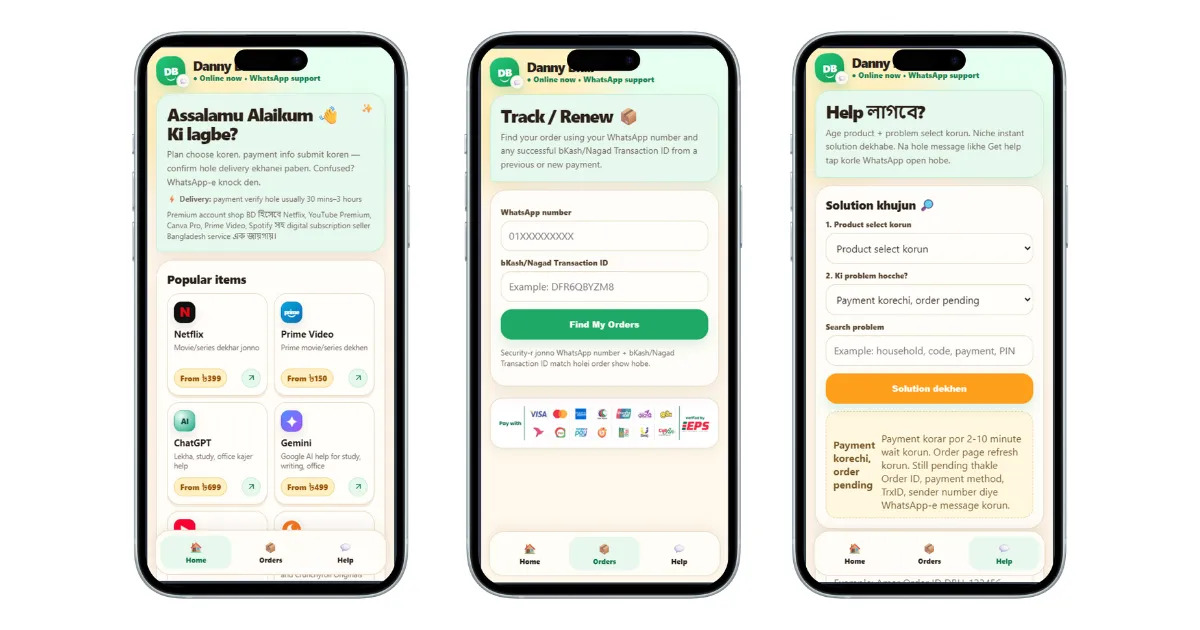
This project started as a relatively simple freelance request.
Danny was selling subscriptions for services such as Netflix, Spotify, and other OTT platforms. Most of his sales happened through WhatsApp. Customers would visit the website, contact the business on WhatsApp, ask about available subscriptions, make a payment, send proof of payment, and wait for someone from the team to verify it and deliver the account.
At the beginning, the business was small enough that this process worked.
The problem was that almost everything depended on a person being available.
Inventory was maintained in spreadsheets and notebooks. Sales were recorded manually. WhatsApp conversations were handled by a small team during working hours. Payments had to be verified manually. Accounts had to be selected and delivered manually.
The business had demand, but its operating process was limiting how much of that demand it could handle.
What started as a request to build an e-commerce website eventually became a much larger engineering project.
Over roughly 1.5 years, I worked with Danny to remove one operational bottleneck at a time until a large part of the sales process could run without someone manually handling every order.
The most interesting part of the project was not any individual feature.
It was how the system evolved from a collection of manual processes into an automated pipeline.
01. The business
Danny was running an online subscription business focused primarily on OTT and digital services.
The customer journey was relatively simple:
Customer
   ↓
Website
   ↓
WhatsApp
   ↓
Product / Subscription Selection
   ↓
Payment
   ↓
Payment Verification
   ↓
Account Delivery
But behind this simple customer journey was a surprisingly manual operation.
A typical order could involve several people:
- A customer contacted the business.
- Someone answered the WhatsApp message.
- The customer selected a subscription.
- The team provided payment instructions.
- The customer made the payment.
- The customer sent a screenshot as proof.
- Someone checked the payment manually.
- Someone checked available inventory.
- An account was selected.
- The account details were sent to the customer.
During busy periods, every order consumed human attention.
There was also a more fundamental problem.
The business was not limited by the number of customers who wanted to buy. It was limited by how many orders the team could process.
02. The first problem: there was no proper operational system
When I first became involved, inventory and sales were being managed through spreadsheets and handwritten records.
This created several problems.
It was difficult to answer basic questions quickly:
- How many accounts are available?
- Which accounts have already been sold?
- Which subscription belongs to which customer?
- How many sales happened today?
- Which products are selling the most?
- Which accounts are close to expiry?
- Who handled a particular sale?
The problem was not that spreadsheets were incapable of storing this information.
The problem was that spreadsheets were being used as the operational system for a business that was already generating enough transactions to need something more structured.
Building the first CMS
I started with a basic internal CMS for inventory and sales.
The goal was intentionally simple.
Instead of immediately building a large business management system, I wanted to establish a reliable source of truth for the data that the team was already maintaining manually.
The system kept track of things such as:
- Products and subscription types
- Available accounts
- Account status
- Sales
- Customer information
- Purchase history
- Subscription dates
- Inventory changes
This gave the team one place to manage the operation.
More importantly, it created the foundation required for later automation.
Automation is difficult when the underlying data is not structured.
Once inventory, customers, orders, and sales existed as structured records, other parts of the workflow could start interacting with them programmatically.
03. The second problem: sales depended on people
The website was only one part of the sales process.
Most customers were actually converting through WhatsApp.
The typical flow looked like this:
Website
   ↓
WhatsApp
   ↓
Conversation
   ↓
Payment Instructions
   ↓
Payment
   ↓
Screenshot
   ↓
Human Verification
   ↓
Human Delivery
The team initially had a few people working roughly during normal daytime hours.
That created two problems.
Limited operating hours
If a customer wanted to purchase something outside working hours, there was nobody available to handle the order immediately.
Weekends were particularly problematic.
The business could receive customers, but there was a delay before somebody could respond and complete the transaction.
Repetitive conversations
A large percentage of WhatsApp conversations followed predictable patterns.
Customers would ask:
- Which subscriptions are available?
- How much does a subscription cost?
- How do I pay?
- Where should I send the payment?
- Has my payment been received?
- When will I receive my account?
There was no reason for a human to manually answer the same questions every time.
04. Building the WhatsApp automation
I built a bot specifically around the way the business actually operated.
This was not intended to be a general-purpose conversational AI system.
The objective was much simpler:
turn the predictable parts of the sales process into a deterministic workflow.
The bot could guide a customer through the purchase process, provide the relevant information, collect the required details, and move the order forward.
The important design decision was that the bot was connected to the business's internal systems.
It was not just answering messages.
It could participate in the actual transaction workflow.
Conceptually:
WhatsApp
    │
    ▼
Conversation Handler
    │
    ├── Product Information
    │
    ├── Customer Information
    │
    ├── Order Creation
    │
    ├── Payment Instructions
    │
    └── Order Status
             │
             ▼
        Internal System
             │
             ├── Inventory
             ├── Payments
             └── Fulfillment
This distinction became important later.
The bot could automate the conversation, but it still could not independently determine whether a customer had actually paid.
That became the next major problem.
05. The hardest problem: payment verification
At the time, there was no suitable payment API available for the exact workflow we needed.
The existing process depended on customers sending a screenshot after making a payment.
That meant the automated workflow stopped here:
Customer
   ↓
Payment
   ↓
Screenshot
   ↓
???
Someone from the team had to look at the screenshot and manually confirm the payment.
This created a hard dependency on human intervention.
Even if the bot handled the entire conversation perfectly, the system still could not complete an order without a person checking the payment.
I initially considered the problem from the point of view of the payment provider.
But the more useful question was:
What reliable signal do we actually receive when a payment happens?
That changed the direction of the solution.
06. Understanding the payment flow
Instead of trying to automate the screenshot verification process, I traced the complete payment flow.
The customer was making a payment through the local payment system.
The banking system generated a transaction notification containing information that could be used to identify the transaction.
The banking app also displayed the transaction reference.
The important pieces of information were:
- Transaction reference / UTR
- Amount
- Payment reference
- Time of transaction
There was also a small additional banking service that provided real-time SMS alerts.
That gave us a new source of payment information.
Instead of asking the customer to prove that they had paid, the system could independently observe the transaction notification.
The architecture changed from:
Customer
   ↓
Payment
   ↓
Screenshot
   ↓
Human
   ↓
Confirmation
to:
Customer
   ↓
Payment
   ↓
Bank Notification
   ↓
Payment Processing
   ↓
Automatic Verification
This was the turning point of the project.
07. Building a payment verification bridge
The bank did not provide the API we wanted.
So instead of integrating directly with a banking API, I built a small Android application that acted as a bridge between the bank's SMS notification and our server.
The application was intentionally limited to the relevant banking notifications.
Its responsibility was straightforward:
Bank SMS
   ↓
Android Application
   ↓
Extract Transaction Data
   ↓
Send to Server
   ↓
Store Transaction
The server could then use the received transaction information as part of the order verification process.
This approach allowed us to use an existing, reliable notification mechanism without requiring the bank to expose a custom API for our use case.
It also separated responsibilities cleanly.
The Android application was responsible for receiving and forwarding the notification.
The server was responsible for understanding what the transaction meant.
08. Making payments identifiable
Receiving a payment notification alone was not enough.
The system needed to know which order the payment belonged to.
This is where unique payment references became important.
When a customer started the payment process, the system generated a unique reference ID for that order.
That reference was included in the payment flow.
The payment therefore became associated with something like:
Order
   │
   ├── Reference ID
   ├── Expected Amount
   └── Customer
When the transaction notification reached the server, the system could compare the transaction information against the pending order.
Conceptually:
Incoming Transaction
        │
        ├── Reference
        ├── Amount
        └── Timestamp
        │
        ▼
Pending Orders
        │
        ▼
Matching Order
        │
        ▼
Payment Confirmed
The amount was also important.
A matching reference alone was not treated as sufficient. The payment needed to correspond to the expected transaction.
This made the verification process much more reliable than simply trusting a screenshot sent by the customer.
09. The payment page
I also changed how customers initiated payments.
Instead of manually sending payment instructions every time, the system generated a payment flow for the specific order.
Customers could either scan a QR code or use a deep link to open the payment application.
The order already had its unique reference.
The customer therefore did not need to communicate the transaction identifier manually to the team.
The payment process became:
Create Order
     ↓
Generate Reference
     ↓
Generate Payment Request
     ↓
Customer Pays
     ↓
Wait for Transaction
This reduced the number of things that the customer and the team had to do manually.
10. Handling the delay between payment and notification
Payment confirmation was not always instantaneous.
The bank notification could arrive after several seconds or more.
The system therefore could not assume that the payment notification would be available immediately after the customer completed the payment.
I introduced a short payment verification window.
The order remained in a pending state while the system periodically checked whether the corresponding transaction had arrived.
The flow was approximately:
Payment Started
      ↓
Order = Pending
      ↓
Check
      ↓
Payment Found?
   /       \
 Yes        No
  ↓          ↓
Confirm    Wait
             ↓
          Check Again
             ↓
         ...
The verification window was around 4 minutes and 30 seconds, with checks approximately every 30 seconds.
In normal operation, the banking notification typically arrived within roughly 30–90 seconds, and the synchronization process took another 1–2 seconds.
This was enough to make payment confirmation feel almost immediate from the customer's perspective.
11. Connecting payment confirmation to fulfillment
The next important step was making sure payment confirmation did not simply change a status in the database.
It needed to trigger the next part of the business process.
Once a payment was confirmed:
Payment Confirmed
       ↓
Find Available Inventory
       ↓
Reserve / Assign Account
       ↓
Create Fulfillment Record
       ↓
Send Account Details
       ↓
Order Completed
The system could now connect the complete transaction.
A customer did not have to wait for somebody to notice a payment, open the inventory system, find an account, and manually send it.
The software could move the order through those steps automatically.
This was the point where the different pieces of the project started functioning as one system.
12. The complete automated workflow
The final workflow looked roughly like this:
                    CUSTOMER
                        │
                        ▼
                   Website
                        │
                        ▼
                    WhatsApp
                        │
                        ▼
                 Sales / Bot Flow
                        │
                        ▼
                    Create Order
                        │
                        ▼
                Generate Reference
                        │
                        ▼
                  Payment Request
                        │
                        ▼
                 Customer Pays
                        │
                        ▼
                Banking Notification
                        │
                        ▼
              Android Sync Application
                        │
                        ▼
                   Backend API
                        │
                        ▼
              Match Reference + Amount
                        │
                        ▼
                 Payment Confirmed
                        │
                        ▼
                 Inventory Lookup
                        │
                        ▼
                 Account Assignment
                        │
                        ▼
                WhatsApp Delivery
                        │
                        ▼
                   Order Complete
What previously required several manual actions had become a single connected workflow.
13. Reducing delivery time
Before the automation, account delivery could take 30–45 minutes.
The delay was not necessarily because the individual actions were difficult.
It came from the number of people and steps involved.
Someone needed to:
- Notice the payment.
- Verify it.
- Update the order.
- Check inventory.
- Select an account.
- Deliver it to the customer.
After the automated flow was introduced, payment confirmation could trigger fulfillment directly.
The typical delivery time dropped from:
30–45 minutes → less than 3 minutes
This was one of the clearest indicators that the automation was solving a real operational problem.
14. Inventory became part of the transaction
The inventory system initially existed as a management tool.
After automation, it became part of the order pipeline.
This distinction mattered.
The system was no longer simply recording that an account existed.
It could use inventory state to decide what should happen next.
For example:
Product Requested
       ↓
Check Inventory
       ↓
Available?
   /       \
 Yes        No
  ↓          ↓
Assign     Handle
Account    Unavailability
This also meant that the business could see its inventory and sales information in the same system that was processing orders.
The operational data and the customer transaction were no longer separate processes.
15. Expiry and follow-up automation
Once the system was handling subscription information, another opportunity became obvious.
A subscription does not necessarily end when the customer stops being interested.
Often, the customer simply forgets that the subscription is about to expire.
I added expiry-related alerts and follow-up notifications.
This created another automated lifecycle:
Subscription Purchased
        ↓
Subscription Active
        ↓
Approaching Expiry
        ↓
Customer Reminder
        ↓
Renewal Opportunity
This was valuable for two reasons.
First, customers did not have to remember the exact expiry date themselves.
Second, the business had a structured way to follow up with existing customers.
This helped increase repeat purchases and made the system useful beyond the initial transaction.
16. Designing around the actual business
One of the most important lessons from this project was that the software did not need to be designed all at once.
The system evolved through real operational problems.
The sequence was roughly:
Website
   ↓
Inventory / Sales CMS
   ↓
WhatsApp Automation
   ↓
Payment Automation
   ↓
Payment Verification
   ↓
Automated Fulfillment
   ↓
Expiry / Follow-up Automation
Each stage solved a problem that had already appeared in the business.
This kept development practical.
Instead of spending months designing a theoretical platform, I could identify the next bottleneck and build the smallest system that removed it.
Once that system was working, it exposed the next bottleneck.
That iterative process was a major part of why the project worked.
17. Working under a real budget constraint
This was also very different from a typical software project.
Danny was running a small business and had a limited technology budget.
During the project, we agreed on a fixed monthly arrangement of around 10,000 BDT per month for active development and technical work.
That constraint influenced how I approached the engineering.
There was no room to build large systems simply because they were technically interesting.
Every feature had to answer a practical question:
Will this reduce operational work, increase sales, reduce errors, or make the business easier to run?
This led to a very pragmatic development style.
For example, building payment verification was more valuable than spending time polishing an internal dashboard that the team rarely used.
Automating WhatsApp was more valuable than building a complex customer portal because WhatsApp was already where most customers were buying.
The system followed the business rather than forcing the business to follow the system.
18. What the numbers showed
Over approximately 1.5 years, the operational changes had a significant effect.
The business went from approximately:
300,000 BDT in sales → 3,000,000 BDT in sales
in the period during which the automation and operational systems were introduced.
That is roughly a 10× increase.
The delivery workflow also changed dramatically:
| Metric | Before | After |
|---|---|---|
| Delivery time | 30–45 minutes | <3 minutes |
| Sales availability | Primarily human working hours | 24/7 automated flow |
| Payment verification | Manual | Automated |
| Inventory tracking | Spreadsheet / diary | Centralized system |
| Order fulfillment | Manual | Automated |
| Expiry follow-up | Manual / inconsistent | Automated |
The numbers should not be interpreted as claiming that software alone caused the entire revenue increase.
There were other factors involved in the business, including demand, product mix, marketing, pricing, and the owner's own work.
What I can say with confidence is that the software removed significant operational constraints that previously limited the number of orders the business could process.
19. What changed operationally
The most important result was not simply revenue.
The business became less dependent on people performing repetitive tasks.
Before:
Customer wants to buy
        ↓
Someone must respond
        ↓
Someone must explain payment
        ↓
Someone must verify payment
        ↓
Someone must find inventory
        ↓
Someone must deliver
After:
Customer wants to buy
        ↓
Automated conversation
        ↓
Automated payment flow
        ↓
Automated verification
        ↓
Automated inventory assignment
        ↓
Automated delivery
People were still important.
They could focus on exceptions, customer issues, inventory management, and growing the business rather than repeatedly performing the same transaction.
That is where I think the project delivered its strongest value.
20. The engineering challenges
Several parts of this project were more difficult than they initially appeared.
Working without an official payment API
The biggest challenge was finding a reliable way to confirm payments without a conventional API.
The solution required understanding the complete payment process and identifying another reliable event source.
The important engineering lesson was:
When an API does not exist, first understand what observable events the system already produces.
That does not always mean finding a workaround.
It means understanding the system before deciding that the required integration is impossible.
Asynchronous payment confirmation
Payment confirmation was inherently asynchronous.
The customer could complete payment before the server received the corresponding notification.
The order therefore needed a state-based workflow rather than a synchronous request-response assumption.
Conceptually:
PENDING
   ↓
PAYMENT_RECEIVED
   ↓
CONFIRMED
   ↓
FULFILLING
   ↓
COMPLETED
This made it possible to handle delays without blocking the customer interaction.
Inventory consistency
Automated fulfillment introduces a new problem.
If two customers purchase the last available account at nearly the same time, the system must avoid assigning the same inventory item twice.
That meant inventory could not simply be treated as a list of records to query.
It had to be treated as state that changes as part of the transaction.
Failure handling
External systems can fail.
A payment notification can be delayed.
A message can fail to send.
An account can become unavailable.
A server can restart.
The automation therefore needed to treat the order as a process with states rather than assuming every operation would succeed on the first attempt.
21. Why I did not build everything as one large system
Looking back, one of the strongest aspects of this project was the incremental architecture.
It would have been easy to design a large platform containing:
- CRM
- Inventory
- Payments
- Analytics
- Notifications
- Fulfillment
- Customer management
from the beginning.
That would have been the wrong approach for this business.
The requirements were not known completely at the start.
They emerged through operation.
The architecture therefore grew around real requirements.
For example, the inventory system became important because manual inventory was slowing operations.
The WhatsApp bot became important because WhatsApp was the primary sales channel.
Payment automation became important because manual verification blocked the bot.
Expiry notifications became important after subscription lifecycle data was available.
Each system earned its place.
22. What I learned from the project
This project changed how I think about business software.
1. The most important problem is often between systems
The difficult part was rarely building a CRUD interface.
The difficult parts were the transitions:
WhatsApp → Order
Order → Payment
Payment → Confirmation
Confirmation → Inventory
Inventory → Fulfillment
Fulfillment → Customer
That is where real operational software creates value.
2. Automation is mostly about removing waiting
A process does not need to be complicated to be slow.
Sometimes the biggest improvement comes from removing the time spent waiting for someone to notice something.
Payment verification was a good example.
The payment itself was fast.
The delay was caused by waiting for a person to check it.
3. Existing systems often provide useful signals
We did not have the payment API we wanted.
But the banking system was already producing transaction notifications.
Finding that signal and connecting it to the application solved the problem.
This is a pattern I have encountered repeatedly since then:
understand the existing system before designing a new one.
4. Good automation needs a reliable source of truth
The WhatsApp bot could not safely automate fulfillment until inventory and orders were represented properly.
Automation built on inconsistent data only makes mistakes happen faster.
5. Business software should follow the user's real workflow
Customers were already using WhatsApp.
Building a completely separate communication system would have added friction.
The better solution was to connect the software to the channel customers were already using.
23. What happened later
The business continued evolving after the initial automation work.
Later, changes in government policies and platform conditions affected the original OTT subscription business model.
The business therefore moved into other areas.
That was outside the control of the software.
However, the systems and engineering work remained useful because the underlying approach was not tied entirely to one product.
Inventory management, sales tracking, automated communication, payment workflows, and customer follow-up are useful patterns across many types of businesses.
I also remained in contact with Danny after the project and continued to help with technical decisions when needed.
24. What this project represents to me
DannyBhai.com is one of the projects that best represents how I like to work.
It was not a large enterprise project.
There was no large engineering team, formal architecture committee, or unlimited infrastructure budget.
It was a small business with a real operational problem.
I started with a website.
Then I discovered the website was not the real problem.
The real problem was everything happening after a customer clicked "buy."
So the work moved deeper into the business:
Website
   ↓
Sales
   ↓
Operations
   ↓
Payments
   ↓
Inventory
   ↓
Fulfillment
   ↓
Customer Retention
Each layer revealed another opportunity to improve the system.
That experience taught me to look beyond the immediate software request and understand the process the software is supposed to support.
For me, that is the main value of this project.
The code was important, but understanding where the business was losing time and how software could remove that loss was more important.
Outcome
The project evolved from a simple e-commerce website into an integrated sales and fulfillment operation.
The key outcomes were:
- A centralized inventory and sales management system replaced spreadsheets and manual records.
- WhatsApp sales became largely automated.
- The sales process could operate outside normal working hours.
- Payment confirmation no longer required someone to manually inspect every transaction.
- Payment confirmation was connected directly to order fulfillment.
- Available inventory could be assigned automatically.
- Account delivery time dropped from 30–45 minutes to less than 3 minutes.
- Expiry and follow-up notifications created a repeat-customer workflow.
- The business grew from approximately 300,000 BDT to 3,000,000 BDT in sales during the period of the transformation.
- The system reduced the amount of repetitive operational work required for each order.
Most importantly, the project demonstrated a simple principle:
Good software does not just automate tasks. It removes the bottlenecks that prevent a business from operating at the level its demand requires.